

10 Nov Un Web Server in 5 minuti
[vc_row css_animation=”” row_type=”row” use_row_as_full_screen_section=”no” type=”full_width” angled_section=”no” text_align=”left” background_image_as_pattern=”without_pattern”][vc_column][vc_column_text css=”.vc_custom_1573427883230{padding-top: 30px !important;padding-bottom: 30px !important;}”]
Gestiremo il progetto Server da una semplice Shell, Linux o Windows che sia.
Per prima cosa occorre installare il generatore express di scheletri di applicazioni:
[/vc_column_text][vc_column_text css=”.vc_custom_1573428756646{padding-top: 30px !important;padding-right: 30px !important;padding-bottom: 30px !important;padding-left: 30px !important;background-color: #ffffff !important;background-position: center !important;background-repeat: no-repeat !important;background-size: contain !important;border-radius: 2px !important;}”]
$ npm install -g express-generator
/usr/bin/express -> /usr/lib/node_modules/express-generator/bin/express-cli.js
+ express-generator@4.16.1
added 10 packages from 13 contributors in 0.899s[/vc_column_text][vc_column_text]
Ci posizioniamo nella directory superiore a quella che conterrà la nostra applicazione server.
Generiamo con Express lo scheletro del nostro programma server che decidiamo di chiamare ad esempio serverManifestazioni:
[/vc_column_text][vc_column_text css=”.vc_custom_1573428773346{padding-top: 30px !important;padding-right: 30px !important;padding-bottom: 30px !important;padding-left: 30px !important;background-color: #ffffff !important;background-position: center !important;background-repeat: no-repeat !important;background-size: contain !important;border-radius: 10px !important;}”]
$ express –view=pug serverManifestazioni
create : serverManifestazioni/
create : serverManifestazioni/public/
create : serverManifestazioni/public/javascripts/
create : serverManifestazioni/public/images/
create : serverManifestazioni/public/stylesheets/
create : serverManifestazioni/public/stylesheets/style.css
create : serverManifestazioni/routes/
create : serverManifestazioni/routes/index.js
create : serverManifestazioni/routes/users.js
create : serverManifestazioni/views/
create : serverManifestazioni/views/error.pug
create : serverManifestazioni/views/index.pug
create : serverManifestazioni/views/layout.pug
create : serverManifestazioni/app.js
create : serverManifestazioni/package.json
create : serverManifestazioni/bin/
create : serverManifestazioni/bin/www[/vc_column_text][/vc_column][/vc_row][vc_row css_animation=”” row_type=”row” use_row_as_full_screen_section=”no” type=”full_width” angled_section=”no” text_align=”left” background_image_as_pattern=”without_pattern”][vc_column][vc_column_text]
Ispezioniamo i files e le directory create:
[/vc_column_text][vc_column_text css=”.vc_custom_1573428794925{padding-top: 30px !important;padding-right: 30px !important;padding-bottom: 30px !important;padding-left: 30px !important;background-color: #ffffff !important;background-position: center !important;background-repeat: no-repeat !important;background-size: contain !important;border-radius: 10px !important;}”]$ cd serverManifestazioni/
$ ls -la
total 32
drwxr-xr-x 6 root root 4096 Nov 10 17:26 .
drwxr-xr-x 10 root root 4096 Nov 10 17:26 ..
-rw-r–r– 1 root root 1074 Nov 10 17:26 app.js
drwxr-xr-x 2 root root 4096 Nov 10 17:26 bin
-rw-r–r– 1 root root 312 Nov 10 17:26 package.json
drwxr-xr-x 5 root root 4096 Nov 10 17:26 public
drwxr-xr-x 2 root root 4096 Nov 10 17:26 routes
drwxr-xr-x 2 root root 4096 Nov 10 17:26 views
$ tree
.
├── app.js
├── bin
│ └── www
├── package.json
├── public
│ ├── images
│ ├── javascripts
│ └── stylesheets
│ └── style.css
├── routes
│ ├── index.js
│ └── users.js
└── views
├── error.pug
├── index.pug
└── layout.pug
7 directories, 9 files[/vc_column_text][/vc_column][/vc_row][vc_row css_animation=”” row_type=”row” use_row_as_full_screen_section=”no” type=”full_width” angled_section=”no” text_align=”left” background_image_as_pattern=”without_pattern”][vc_column][vc_column_text css=”.vc_custom_1573425862841{margin-top: 30px !important;border-bottom-width: 30px !important;}”]
La nostra applicazione contiene i riferimenti alle librerie che le servono. Per installarle usiamo il comando seguente:
[/vc_column_text][vc_column_text css=”.vc_custom_1573428807390{padding-top: 30px !important;padding-right: 30px !important;padding-bottom: 30px !important;padding-left: 30px !important;background-color: #ffffff !important;background-position: center !important;background-repeat: no-repeat !important;background-size: contain !important;}”]
$ npm install
> core-js@2.6.10 postinstall $ node_modules/core-js
> node postinstall || echo “ignore”
Thank you for using core-js ( https://github.com/zloirock/core-js ) for polyfilling JavaScript standard library!
The project needs your help! Please consider supporting of core-js on Open Collective or Patreon:
> https://opencollective.com/core-js
> https://www.patreon.com/zloirock
Also, the author of core-js ( https://github.com/zloirock ) is looking for a good job -)
npm notice created a lockfile as package-lock.json. You should commit this file.
added 118 packages from 174 contributors and audited 247 packages in 8.117s
found 1 low severity vulnerability
run `npm audit fix` to fix them, or `npm audit` for details
$[/vc_column_text][/vc_column][/vc_row][vc_row css_animation=”” row_type=”row” use_row_as_full_screen_section=”no” type=”full_width” angled_section=”no” text_align=”left” background_image_as_pattern=”without_pattern”][vc_column][vc_column_text css=”.vc_custom_1573426382845{padding-top: 30px !important;padding-bottom: 30px !important;}”]
Ora possiamo far girare il Server per la prima volta:
[/vc_column_text][/vc_column][/vc_row][vc_row css_animation=”” row_type=”row” use_row_as_full_screen_section=”no” type=”full_width” angled_section=”no” text_align=”left” background_image_as_pattern=”without_pattern”][vc_column][vc_column_text css=”.vc_custom_1573428823381{padding-top: 30px !important;padding-right: 30px !important;padding-bottom: 30px !important;padding-left: 30px !important;background-color: #ffffff !important;background-position: center !important;background-repeat: no-repeat !important;background-size: contain !important;}”]
$ npm start
> servermanifestazioni@0.0.0 start /root/davide/serverManifestazioni
> node ./bin/www[/vc_column_text][/vc_column][/vc_row][vc_row css_animation=”” row_type=”row” use_row_as_full_screen_section=”no” type=”full_width” angled_section=”no” text_align=”left” background_image_as_pattern=”without_pattern”][vc_column][vc_column_text css=”.vc_custom_1573427155363{padding-top: 30px !important;padding-bottom: 30px !important;}”]
TEST che il Server funzioni:
Sulla stessa macchina su cui avete lanciato il server aprite un Browser e nella barra degli indirizzi scrivete
localhost:3000
[/vc_column_text][vc_column_text]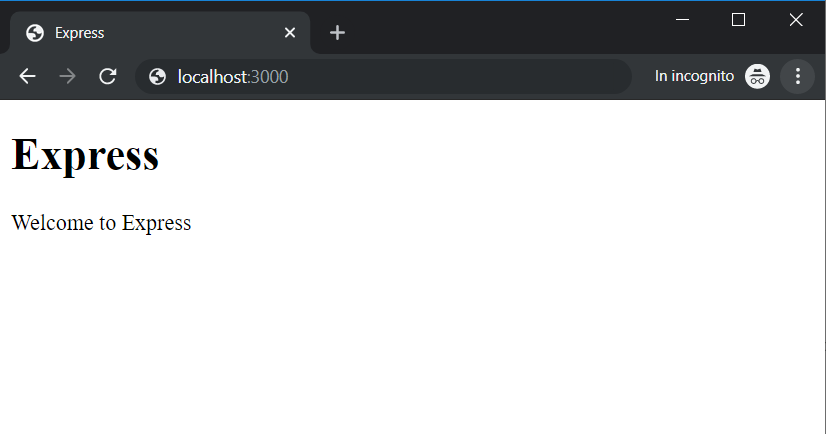 [/vc_column_text][/vc_column][/vc_row]
Sorry, the comment form is closed at this time.